Bringing Rulebooks
All On Board! allows you to show players, through a floating panel that can be moved around, paginated content that is stored as images. To do so, you simply need to have the images inside your game’s folder and set up a Data Asset of class Rulebook Data Asset.
All On Board! supports English, French, German, Italian, and Spanish. You can assign a Rulebook Data Asset to each supported language and set one as the default. This default provides players with a fallback when no rulebook is assigned to their current language. You can also use it when creating mods in unsupported languages.
Step 1 - Create a folder for the rulebooks
In your game’s directory, create a new folder called “Rulebook”.
Step 2 - Import the PDF files
Right-click the newly created folder, hover over “Import Rulebook PDF,” and select the language into which you want to import your rulebook. Then, select the PDF file you want to import.
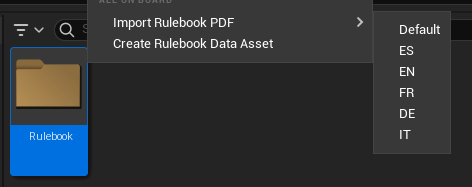
Repeat this step with all the languages you like.
If your learning material is in image format, you can instead create subfolders inside “Rulebook” called ES, EN, FR, DE, IT, or Default and import the images directly into the project.
Step 3 - Create the Rulebook Data Asset
Once you have imported all the rulebooks you want, right-click on the “Rulebook” folder and press “Create Rulebook Data Asset”.
Once done, you can start the game and open the rulebooks through the Wristwatch Menu.