Smart Glance Config
Smart Glance is a tool provided by All On Board! that displays contextual information and available actions for the game elements the player points at.
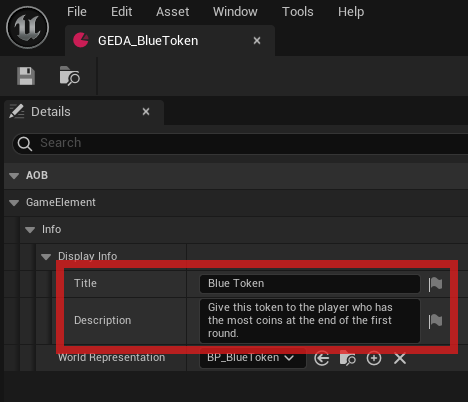
At its simplest, it shows a name and a description, both set in the Game Element Data Asset created alongside your Game Element's Blueprint. To use it, add the "Smart Glance Config" component to your Blueprint and fill in the Data Asset's fields with the text you want to show.
Customizing Smart Glance
You can expand the system by making your own Smart Glance Widgets and adding new fields to the Game Element Data Assets.
To keep it simple, this guide will explain how to customize the appearance of the widget, but if you want to know more about expanding the data of Game Element Data Assets, head to the Technical Docs.
Step 1 - Create a new widget
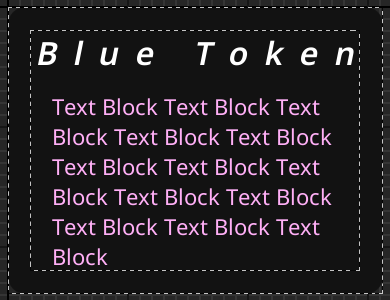
Create a Widget Blueprint of class “Smart Glance Info Widget” and implement your design. Widgets are blank canvases, so you can make anything you like, as long as they aren’t translucent.
In this example, we will copy the default widget layout, which is called WBP_SmartGlanceInfoWidget_Basic, and just change the texts’ font style and color.
Step 2 - Link the new Widget to your Game Element
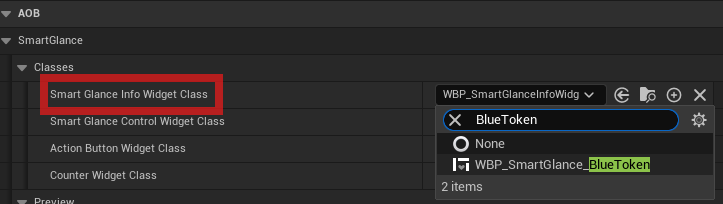
Head to the Game Element’s Blueprint and, inside the "Smart Glance Config" component, set the parameter “Smart Glance Info Widget Class” to be the Widget Blueprint you created.