Handling Data
Every Blueprint that has a Game Element Component inside it has the ability to store data that is replicated among players and persists across sessions. Data is stored in what we call a page of a notebook, where each page is a collection of data registries linked to a different Game Element. Each data registry is associated with a Key, so we can look for it to read it or modify it.
Supported types
The supported data types are:
Simple types
- Boolean
- Integer
- String
Arrays
- Array of Integer
- Array of Name
Maps
- Map of Integer → Integer
- Map of Integer → Name
- Map of Name → Integer
- Map of Name → Name
Choosing where to store the data
Although you could store any data on any Game Element, we recommend you following this guidelines:
- If the data affects the overall state of the game, store it on the Global Game Data element’s page.
- If the data is relevant for just a specific Game Element, store it on said element’s page.
- If the data is player-specific, store it on their Team Space’s page.
Writing data
To write data, you need to get the Game Element ID of the element you want to store data on.
Depending on where you want to store the data, you must find out the Game Element ID differently.
- For global data, get a reference to the
Global Game Data Subsystemand call the functionTry Get Global Game Data Element ID. - For element-specific data, get a reference for its Game Element component and call the function
Get Game Element ID.- If you have a reference to the game element’s actor, you can call the macro function
Get Game Element IDinstead.
- If you have a reference to the game element’s actor, you can call the macro function
- For player-specific data, get a reference to the
Team Space Management Subsystemand call the functionGet Team Space Game Element ID.
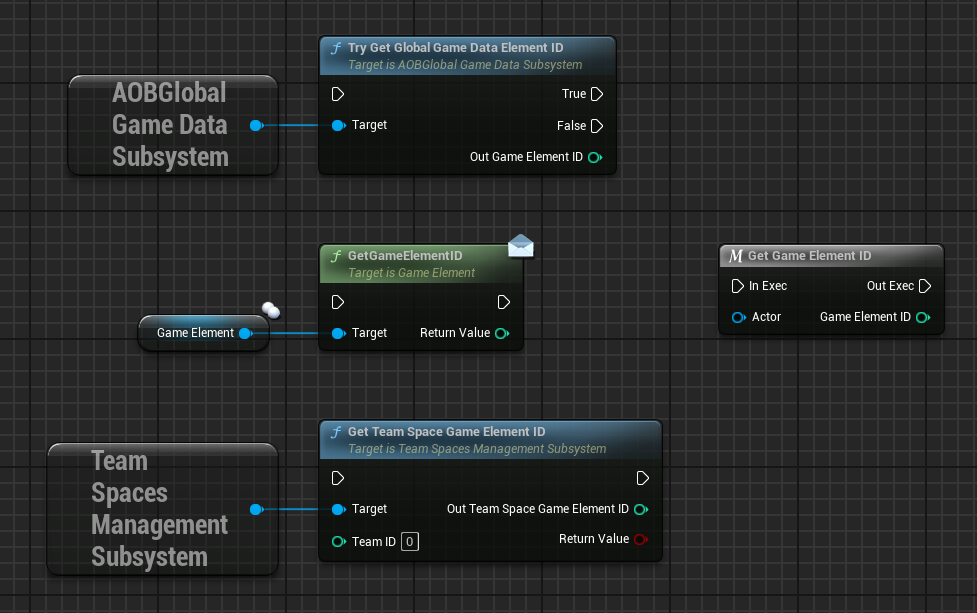
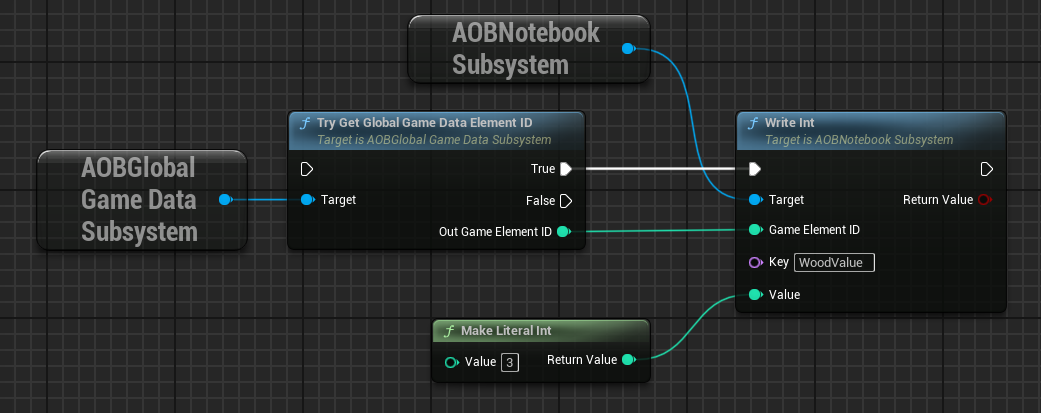
Once you have it, get a reference to the Notebook Subsystem and call the function “Write Int”, “Write String”, or similar ones, depending on which data type you want to store, and fill its parameters:
- Game Element ID
- Key
- Value
Reacting to data updates
Although data is automatically replicated among players, your game determines how to handle it.
The Game Element Component includes an event called “OnGameElementUpdateDelegate”, which is triggered whenever data stored on the element’s Notebook Page changes.
For example, if a player writes a value associated with the key “Score” to the Notebook, the event is triggered. You must then check whether the Updated Key equals “Score” and, if it does, read the value from the Notebook and use it to update the relevant parameter.
Note that the Notebook’s “Read Int” function returns a Boolean. If it returns “False”, no entry exists on the Notebook Page for the specified key.

Persisting data
Any data written to the Notebook is stored in the save file created when the game is saved. However, your game may need to read that data after the save file is loaded. To do so, use the Game Element Component’s “OnGameElementInitializeDelegate” event, which is triggered when the Game Element finishes initializing. The event includes a “Created From Snapshot” parameter, which is true when the Game Element was loaded from a save file.